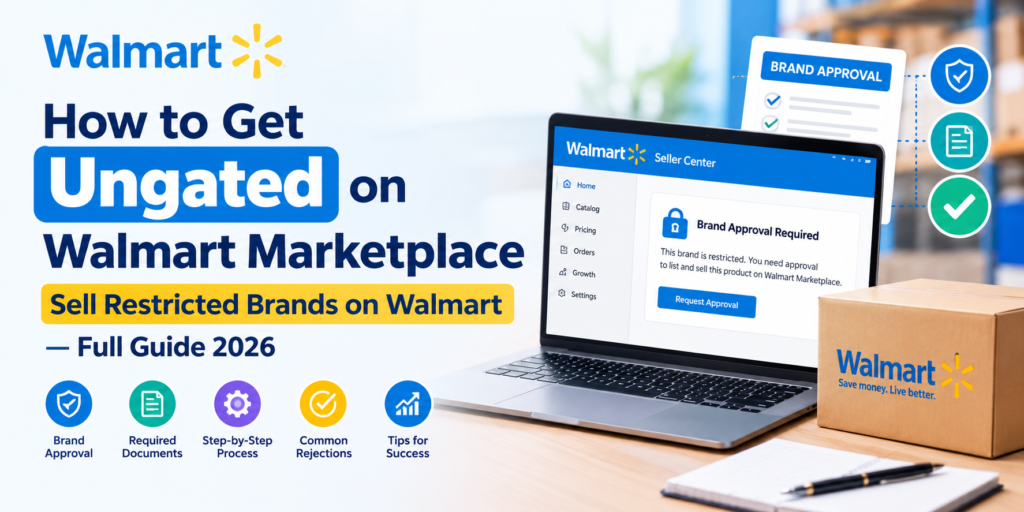
Selling on Walmart Marketplace can be a great opportunity for eCommerce sellers, but not every brand or product is immediately available to every seller. If you try to list a restricted brand, you may see an approval requirement or a listing restriction in Walmart Seller Center. This can prevent your product from going live until Walmart reviews and approves your eligibility.
The good news is that eligible sellers can request approval for certain restricted brands or products by providing the appropriate business and product documentation. In this guide, we’ll explain how Walmart Marketplace brand restrictions work, what documents you may need, how to request approval, common reasons for rejection, and what sellers should do before applying.
What Does “Ungated” Mean on Walmart Marketplace?
“Ungated” is a common seller term used to describe having approval to sell a brand, product, or category that previously required additional authorization.
When a brand or product is restricted, Walmart may prevent you from publishing or selling it until the required approval is obtained.
Walmart maintains restrictions and pre-approval requirements as part of its marketplace compliance and product-quality controls. Walmart also states that some categories and brands may require pre-approval before sellers can offer them on the Marketplace.
For example, you may encounter a restriction when trying to list:
- A restricted brand
- A restricted product
- A category requiring pre-approval
- Certain luxury or seasonal products
- Products requiring additional compliance documentation
- Products subject to Walmart’s marketplace policies
Getting approved does not mean that every product from that brand will automatically be eligible. Product-level, category-level, and policy restrictions can still apply.
Why Does Walmart Restrict Certain Brands?
Walmart uses marketplace restrictions to help maintain product quality, authenticity, customer trust, and compliance.
Walmart says it uses seller verification, pre-listing protections, listing monitoring, and enforcement measures to help protect the marketplace from policy violations and intellectual-property issues.
Brand restrictions can therefore be related to factors such as:
- Brand authorization
- Product authenticity
- Intellectual property protection
- Category restrictions
- Compliance requirements
- Walmart’s business decisions
- Brand-specific selling permissions
Because restrictions can change, sellers should verify the current requirements inside the Seller Center before submitting an application.
How to Check If a Brand Is Restricted on Walmart
Before purchasing inventory, it is important to determine whether the brand or product can be sold on your Walmart Marketplace account.
Start by attempting to add the product through Walmart Seller Center.
Depending on the product and account, Walmart may indicate that additional approval or review is required.
You should also review the product’s status under your catalog and check for listing issues. Walmart’s Seller Center provides areas such as Unpublished Items and Pending Review where sellers can identify catalog issues that require attention.
Before purchasing inventory, check:
- Brand eligibility
- Product restrictions
- Category restrictions
- Product ID/GTIN requirements
- Existing listing status
- Required documentation
- Walmart’s Prohibited Products Policy
This is especially important because buying inventory before confirming marketplace eligibility can create unnecessary financial risk.
Documents You May Need for Walmart Brand Approval
One of the most important parts of the approval process is providing documentation that supports your relationship with the brand and the authenticity of the products.
The exact documents Walmart requests can vary depending on the brand, product, category, and approval request.
Depending on the situation, you may need documentation such as:
1. Supplier Invoices
A valid commercial invoice can help demonstrate that your inventory comes from a legitimate business source.
Make sure the information is clear and consistent, including:
- Your legal business name
- Supplier or distributor name
- Supplier contact information
- Invoice date
- Product information
- Quantities purchased
- Business addresses
Avoid submitting altered, incomplete, or unverifiable documents.
2. Letter of Authorization (LOA)
Some brand approval situations may require evidence that you are authorized to resell the brand.
An LOA may establish the relationship between:
Brand Owner → Distributor/Supplier → Seller
The document should accurately represent your actual business relationship.
3. Supplier Information
Walmart may need information about your supplier or source of inventory.
Be prepared to provide:
- Supplier name
- Supplier address
- Supplier website
- Supplier contact information
- Distributor information
- Your relationship with the supplier
4. Product Information
Depending on the product, you may also need:
- UPC/GTIN
- Product images
- Packaging images
- Product labels
- Manufacturer information
- Compliance documentation
Walmart requires products listed on Marketplace to comply with its marketplace policies and product requirements.
Step-by-Step: How to Get Ungated on Walmart Marketplace
The exact workflow can vary depending on the restriction shown in your Seller Center account. However, the general process looks like this.
Step 1: Identify the Restricted Brand or Product
First, determine exactly what Walmart is restricting.
Do not assume the issue is always the brand.
The restriction may be related to:
- Brand
- Category
- Product
- Compliance
- Product data
- Intellectual property
- Walmart business restrictions
Read the error or restriction message carefully before submitting an approval request.
Step 2: Verify That the Product Is Eligible
Before requesting approval, confirm that the product itself is allowed on Walmart Marketplace.
Walmart requires sellers to maintain catalogs that comply with its Prohibited Products Policy. Certain products may be prohibited entirely, while other products or categories may require pre-approval.
This distinction is important:
Restricted does not always mean prohibited.
A restricted product may have an approval path, while a prohibited product may not be eligible for sale.
Step 3: Prepare Your Documentation
Collect all relevant documentation before submitting the request.
Your documents should be:
- Genuine
- Current
- Legible
- Consistent
- Related to the exact brand/product
- Connected to your business
- From a legitimate source
Make sure your business name and other identifying information are consistent across your Seller Center account and supporting documents.
Incomplete or inconsistent documentation can make the review process more difficult.
Step 4: Submit the Approval Request
If Walmart provides an approval option for the restricted brand or product, follow the instructions shown in the Seller Center.
Depending on the restriction, Walmart may request documentation or additional information about your business and product source.
For some pre-approval categories, Walmart’s published guidance instructs sellers to contact Partner Support and provide a list of the brands or items they want to sell.
Because Walmart’s Seller Center workflow can change, always follow the approval path currently displayed in your account rather than relying on an older tutorial.
Step 5: Wait for Walmart’s Review
After submitting your request, Walmart reviews the information and supporting documents.
Approval is not automatic.
Walmart may:
- Approve the request
- Request additional information
- Ask for additional documentation
- Decline the request
- Restrict the specific product or brand
The review outcome can depend on the specific brand, product, seller account, and documentation provided.
Step 6: Verify Your Listing After Approval
Once approval is granted, do not immediately assume every SKU under that brand is eligible.
Test the specific products you want to sell and check their status in the Seller Center.
Look for:
- Listing status
- Product restrictions
- Pending review
- Unpublished status
- Compliance warnings
- Product-level errors
Walmart provides Seller Center tools for monitoring unpublished items and pending catalog issues.
Common Reasons Walmart Brand Approval Requests Are Rejected
Getting rejected does not necessarily mean that the brand can never be sold. However, it is important to identify the reason for the rejection before submitting another request. Common issues can include:
Incomplete Documentation: Missing invoices, supplier information, authorization documents, or product details can make it difficult to verify eligibility.
Inconsistent Business Information: If your business name or address does not match between your Walmart account and submitted documents, the information may require further review.
Unclear Supplier Relationship: Walmart may need to understand where the products come from and whether your supply chain is legitimate.
Unsupported or Unverifiable Documents: Documents that cannot be verified or do not clearly establish the product source may not provide sufficient evidence.
Product-Level Restrictions: Sometimes the issue is not the brand itself. A particular product may have separate restrictions or compliance requirements.
Prohibited Product: If the product falls under Walmart’s prohibited products policy, obtaining a brand approval may not make the product eligible for sale. Walmart states that prohibited products can be removed and that policy violations may lead to corrective action.
Restricted vs. Prohibited Products: What’s the Difference?
This is one of the most important things Walmart sellers need to understand.
Restricted
- A restricted brand, category, or product may require additional approval before you can sell it.
- Depending on the restriction, you may be able to submit documentation or request pre-approval.
Prohibited
- A prohibited product is not eligible for sale under Walmart’s applicable marketplace policy.
- Therefore, simply obtaining an invoice or authorization letter does not mean a prohibited product can be listed.
- Always check Walmart’s current Prohibited Products Policy before sourcing inventory.
Can You Sell a Restricted Brand Without Approval?
If Walmart requires approval for a particular brand or product, attempting to list it without the required authorization can result in the listing being blocked or unpublished.
Walmart actively monitors marketplace listings for policy compliance and intellectual-property issues.
For this reason, sellers should not try to bypass brand restrictions by:
- Changing the brand name
- Using incorrect product information
- Creating duplicate listings
- Using another brand’s product information
- Providing inaccurate documentation
The safer approach is to resolve the restriction through Walmart’s official approval and support processes.
Tips to Improve Your Walmart Ungating Application
If you’re preparing an approval request, focus on documentation quality and accuracy.
Tip 1: Check the Restriction First
Understand exactly what Walmart is asking you to resolve before preparing documents.
Tip 2: Use Legitimate Sources
Maintain a clear and traceable supply chain.
Tip 3: Keep Documents Consistent
Your business name and other important information should match across your account and documentation.
Tip 4: Submit Complete Information
Avoid submitting an application with missing information and waiting for Walmart to request it later.
Tip 5: Don’t Alter Documents
Never edit invoices, authorization letters, or other business documents to make them appear to meet Walmart’s requirements.
Tip 6: Check Product Eligibility Separately
Even after receiving brand approval, verify individual products before adding them to your catalog.
Tip 7: Keep Your Approval Records
Save copies of approval communications and supporting documents for your internal compliance records.
What If Walmart Rejects Your Brand Approval?
If your application is rejected, first identify the reason provided by Walmart.
Then review:
- The original restriction
- The submitted documents
- Your supplier information
- Product information
- The applicable Walmart policy
- Any additional requirements mentioned by Walmart
If additional documentation is requested, provide accurate information that directly addresses the issue.
Avoid repeatedly submitting the same incomplete application without resolving the underlying problem.
If the restriction is unclear, use Walmart’s Seller Help or Partner Support channels to request clarification.
Walmart Brand Approval vs. Walmart Brand Portal
Sellers should also understand that brand selling approval and Brand Portal are not necessarily the same thing.
Walmart Brand Portal is designed for managing brands and intellectual-property rights. Walmart states that an active trademark registration with the USPTO is required for each brand registered through Brand Portal.
Brand Portal can help brand owners manage brand information, intellectual-property claims, and authorized users.
If you are a reseller trying to obtain permission to sell an existing restricted brand, follow the approval process applicable to your Seller Center account and the specific restriction.
Does Walmart Ungating Guarantee That You Can Sell Every Product From a Brand?
No. Brand approval does not necessarily remove every other restriction. A product can still be affected by:
- Category restrictions
- Product compliance requirements
- Prohibited Products Policy
- Intellectual-property restrictions
- Product-specific restrictions
- Listing-quality requirements
Walmart’s marketplace requirements apply at multiple levels, so sellers should verify the eligibility of each product they plan to list.
Should You Buy Inventory Before Getting Walmart Approval?
For restricted brands, it is generally important to verify marketplace eligibility before making a significant inventory investment.
Imagine purchasing $20,000 worth of inventory only to discover that your Walmart account cannot list the brand.
Checking restrictions first can help reduce this type of risk.
A practical workflow is:
Research Brand → Check Walmart Eligibility → Verify Product → Prepare Documentation → Request Approval → Receive Approval → List Product
This approach helps sellers build a more controlled and compliant Walmart catalog.
How Digital Solutions Zone Can Help With Walmart Brand Approval
At Digital Solutions Zone (DSZ), we help brands and sellers manage their Walmart Marketplace operations, including restricted products, catalog issues, listing optimization, and marketplace growth.
Our Walmart Marketplace services include:
- Walmart Seller Account Setup
- Restricted Brand & Product Analysis
- Brand Approval Support
- Product Listing Creation & Optimization
- Catalog Management
- Walmart Fulfillment Services (WFS) Support
- Listing Error Resolution
- Inventory & Order Management
- Walmart Advertising Management
- Product Content Optimization
- Marketplace Performance Management
- Multi-Channel eCommerce Solutions
If you’re facing a restricted brand issue, our team can help review the restriction, organize the available documentation, identify potential listing issues, and guide you through the Walmart approval process.
Note: Walmart makes the final decision on marketplace approvals. DSZ can assist with preparation and submission, but no third party can guarantee Walmart approval.
Final Thoughts
Getting ungated on Walmart Marketplace is not simply about submitting an invoice and waiting for approval.
The process starts with understanding why the brand or product is restricted, confirming that the product is eligible, preparing accurate documentation, and following Walmart’s current approval process.
The most important steps are:
- Check the restriction before sourcing inventory
- Understand whether the product is restricted or prohibited
- Maintain legitimate supplier relationships
- Prepare accurate supporting documents
- Submit complete information
- Monitor your Seller Center status
- Verify individual products after approval
- Maintain marketplace compliance
For sellers looking to expand their Walmart catalog, understanding the brand approval process can help prevent unnecessary listing problems and inventory risks.
If you are dealing with restricted brands or products on Walmart Marketplace, make sure you review the current Walmart policies and Seller Center requirements before submitting your application.
Frequently Asked Questions (FAQs)
What does ungated mean on Walmart Marketplace?
Ungated generally means that a seller has received approval to sell a brand, product, or category that previously required additional authorization or review.
How do I know if a Walmart brand is restricted?
Try adding the product through Walmart Seller Center and review the restriction or approval message shown for the product. You can also check your catalog for unpublished or pending-review issues.
What documents are needed to get ungated on Walmart?
Requirements vary by brand and product. Depending on the situation, Walmart may request invoices, supplier information, authorization documentation, product information, or other supporting documents.
Can I get approved to sell any restricted Walmart brand?
Not necessarily. Approval depends on Walmart’s requirements and the specific brand, product, seller account, and documentation. Some products may be prohibited rather than simply restricted.
Can I sell a prohibited product after getting brand approval?
No. Brand approval does not override Walmart’s Prohibited Products Policy. Products that are prohibited under Walmart’s applicable policies may not be eligible for sale.
How long does Walmart brand approval take?
The review time can vary depending on the type of restriction, documentation, and Walmart’s review process. Sellers should follow the status and instructions provided through Seller Center or Walmart support.
Can Walmart reject my brand approval application?
Yes. Walmart may decline an approval request or request additional information if the submitted documentation does not satisfy the applicable requirements.
Can Digital Solutions Zone help with Walmart brand approval?
Yes. Digital Solutions Zone can help sellers review Walmart brand restrictions, organize supporting documentation, identify catalog issues, and navigate the approval process. However, Walmart makes the final approval decision.